
Quick answer: Modern web scraping is a permission-first data engineering workflow: use an official API or data export when available, fetch only pages you are allowed to access, identify your client, and apply conservative rate limits. Use asynchronous HTTP for ordinary documents, a browser for authorized JavaScript-driven workflows, and Scrapy when you need a maintainable crawl pipeline. If a site blocks automation or requires authentication you do not have, stop and request access rather than attempting to defeat its controls.
Web scraping in 2027 is less about collecting the largest number of pages and more about producing dependable, traceable data without creating risk for the source site or your organization. A production system needs explicit scope, resilient networking, parser tests, observability, secure storage, and a documented legal basis—not just selectors that happen to work today.
This guide builds that foundation with Python. Examples are intended for sites you own, systems for which you have written authorization, or data sources whose terms explicitly permit automated access. A public URL is not, by itself, permission to copy, reuse, or republish everything it contains.
1. The Ethical and Legal Compass#
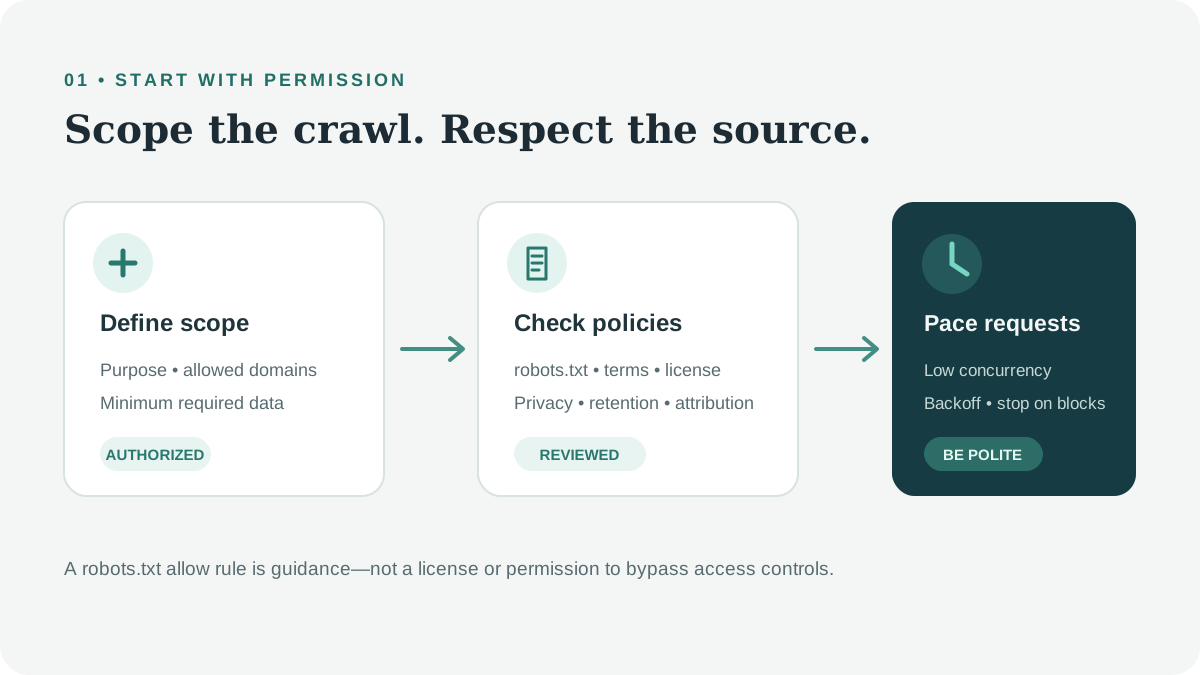
Before writing a crawler, answer four questions:
- What exact data do you need, and why? Keep the collection narrow and set a retention period.
- Do you have permission? Check the provider’s API, license, terms of service (ToS), and written agreements.
- Could the data identify a person or contain confidential information? Avoid collecting it unless you have a clear lawful basis and safeguards.
- Can the source handle your request rate? Set a low per-host concurrency limit and a clear contact identity.
robots.txt communicates crawl preferences; it is not an access-control mechanism, a license, or legal advice. Read it alongside the site’s terms and applicable laws. Public availability does not automatically remove privacy, copyright, database-right, contract, or attribution obligations. Rules vary by jurisdiction; seek qualified legal advice for commercial or sensitive projects.
Check robots.txt with Python#
Python’s urllib.robotparser can determine whether a user agent is allowed to fetch a URL under the directives it understands. Set a descriptive user agent with a contact route you control, cache the result, and fail closed if the policy cannot be retrieved.
from urllib.error import URLError
from urllib.robotparser import RobotFileParser
from urllib.parse import urlsplit, urlunsplit
from urllib.request import Request, urlopen

USER_AGENT = "ExampleResearchBot/1.0 (+https://example.org/crawler-info)"


def allowed_by_robots(url: str) -> bool:
    parts = urlsplit(url)
    robots_url = urlunsplit((parts.scheme, parts.netloc, "/robots.txt", "", ""))
    parser = RobotFileParser()
    parser.set_url(robots_url)

    try:
        request = Request(robots_url, headers={"User-Agent": USER_AGENT})
        with urlopen(request, timeout=10) as response:
            if response.status >= 400:
                return False
            parser.parse(response.read().decode("utf-8", errors="replace").splitlines())
    except (URLError, TimeoutError, OSError):
        return False

    return parser.can_fetch(USER_AGENT, url)
In a real crawler, fetch and cache each origin’s policy once, apply any published crawl delay conservatively, and record the policy version and check time. robots.txt rules can change; re-check them periodically. A robots allow rule does not override authentication, a site’s terms, or a legal restriction.
Rate limiting and bounded retries#
Retries are for transient failures, not a way to push through a block. Retry only safe, idempotent requests; honor Retry-After; cap attempts; add jitter; and stop on authentication or policy errors. A 429 Too Many Requests response is a signal to slow down or pause, not to switch identities.
import asyncio
import random
from collections.abc import Awaitable, Callable
from datetime import datetime, timezone
from email.utils import parsedate_to_datetime
from functools import wraps
from typing import ParamSpec, TypeVar

import httpx

P = ParamSpec("P")
R = TypeVar("R")
RETRYABLE = {429, 500, 502, 503, 504}


def retry_transient(
    attempts: int = 4,
    base_delay: float = 1.0,
    max_delay: float = 30.0,
) -> Callable[[Callable[P, Awaitable[R]]], Callable[P, Awaitable[R]]]:
    def decorate(func: Callable[P, Awaitable[R]]) -> Callable[P, Awaitable[R]]:
        @wraps(func)
        async def wrapped(*args: P.args, **kwargs: P.kwargs) -> R:
            for attempt in range(attempts):
                try:
                    return await func(*args, **kwargs)
                except httpx.HTTPStatusError as exc:
                    if exc.response.status_code not in RETRYABLE or attempt == attempts - 1:
                        raise
                    retry_after = exc.response.headers.get("Retry-After")
                    try:
                        server_delay = float(retry_after) if retry_after else 0.0
                    except ValueError:
                        try:
                            retry_date = parsedate_to_datetime(retry_after)
                            if retry_date.tzinfo is None:
                                retry_date = retry_date.replace(tzinfo=timezone.utc)
                            server_delay = max(
                                0.0,
                                (retry_date - datetime.now(timezone.utc)).total_seconds(),
                            )
                        except (TypeError, ValueError, OverflowError):
                            server_delay = 0.0
                    backoff = min(max_delay, base_delay * (2**attempt))
                    await asyncio.sleep(max(server_delay, backoff) + random.uniform(0, 0.25))
                except (httpx.TimeoutException, httpx.NetworkError):
                    if attempt == attempts - 1:
                        raise
                    backoff = min(max_delay, base_delay * (2**attempt))
                    await asyncio.sleep(backoff + random.uniform(0, 0.25))
            raise RuntimeError("Retry loop ended unexpectedly")

        return wrapped

    return decorate
Do not retry every exception. In particular, do not retry indefinitely, and do not treat 401, 403, CAPTCHA, or other access-control responses as transient network faults.
2. Level One: Static Pages and Supported APIs#
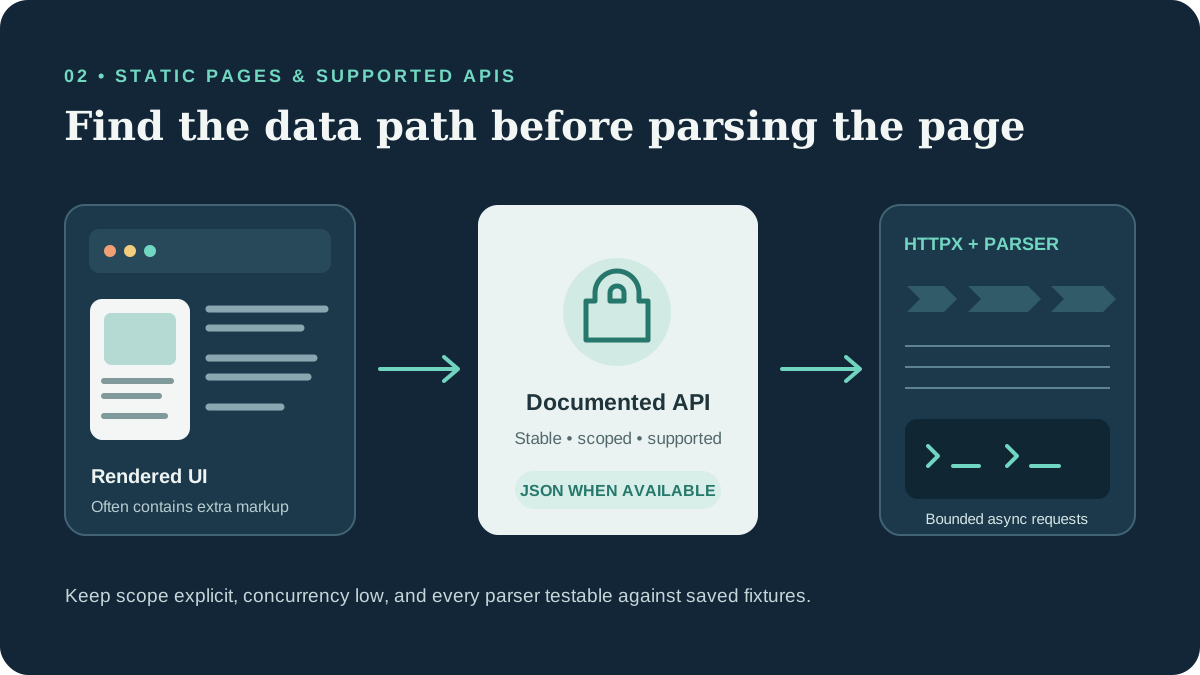
Look for a supported data interface first#
An HTML page is a presentation layer, not necessarily the best data source. Before parsing it:
- Look for a documented API, downloadable dataset, RSS/Atom feed, or partner export.
- Review the provider’s API terms, authentication requirements, quotas, and attribution rules.
- Use browser developer tools to understand how your own application loads data, or systems where you have explicit permission to inspect network traffic.
- Prefer a stable, documented endpoint over an undocumented internal route.
An endpoint visible in a browser is not automatically a public API. Do not copy session cookies, bearer tokens, or credentials from another user’s browser, and do not call private endpoints without authorization. If a vendor offers an API, use its documented authentication flow and protect credentials as secrets.
Asynchronous HTTP with HTTPX#
Async I/O can improve throughput when requests are independent and the source permits concurrency. It is not inherently “10x faster”: total performance depends on network latency, server limits, parsing cost, and your concurrency settings. Keep a small per-origin limit and measure before increasing it.
import asyncio
from urllib.parse import urlparse

import httpx
from bs4 import BeautifulSoup

USER_AGENT = "ExampleResearchBot/1.0 (+https://example.org/crawler-info)"
ALLOWED_HOSTS = {"docs.example.org"}


async def fetch_page(client: httpx.AsyncClient, url: str) -> tuple[str, str]:
    host = urlparse(url).hostname
    if host not in ALLOWED_HOSTS:
        raise ValueError(f"Host is outside the configured scope: {host}")

    response = await client.get(url)
    response.raise_for_status()
    return url, response.text


async def main(urls: list[str]) -> None:
    limits = httpx.Limits(max_connections=4, max_keepalive_connections=2)
    timeout = httpx.Timeout(15.0, connect=5.0)
    async with httpx.AsyncClient(
        headers={"User-Agent": USER_AGENT},
        limits=limits,
        timeout=timeout,
        follow_redirects=False,
    ) as client:
        pages = await asyncio.gather(*(fetch_page(client, url) for url in urls))

    for url, html in pages:
        soup = BeautifulSoup(html, "html.parser")
        title = soup.title.get_text(" ", strip=True) if soup.title else "(no title)"
        print({"url": url, "title": title})


if __name__ == "__main__":
    asyncio.run(main([
        "https://docs.example.org/guide/",
        "https://docs.example.org/reference/",
    ]))
This example deliberately disables automatic redirects and constrains hosts. In production, validate every redirect target before following it: otherwise a crawler that accepts user-supplied URLs can become a server-side request forgery (SSRF) path into internal networks. Add robots checks, a per-host limiter, bounded retries, response-size limits, structured logs, and parser tests before expanding the scope.
BeautifulSoup, lxml, and Parsel#
| Tool | Strength | Good fit |
|---|---|---|
| BeautifulSoup | Readable API and forgiving HTML parsing | Small jobs, prototypes, irregular markup |
lxml | Fast HTML/XML parsing with XPath and CSS selectors | Larger documents or performance-sensitive parsing |
| Parsel | CSS/XPath selectors and response integration used by Scrapy | Reusable selectors in Scrapy spiders |
from lxml import html
from parsel import Selector
from bs4 import BeautifulSoup

document = "<article><h1>Guide</h1><a href='/next'>Continue</a></article>"

soup = BeautifulSoup(document, "html.parser")
print(soup.select_one("article h1").get_text(strip=True))

tree = html.fromstring(document)
print(tree.xpath("string(//article/h1)").strip())

selector = Selector(text=document)
print(selector.css("article h1::text").get())
Benchmark on representative pages. Parsing speed is rarely the first bottleneck when the workload is waiting on network responses, and a faster parser does not compensate for brittle selectors.
3. Level Two: Authorized Dynamic Websites#
Playwright and Selenium#
Both tools automate browsers. Playwright provides isolated browser contexts, convenient auto-waiting locators, and native asynchronous APIs in Python. Selenium has a broad ecosystem and WebDriver support across browser vendors. Choose based on your team’s existing tests, required browsers, deployment environment, and support needs—not on a claim that one tool works everywhere.
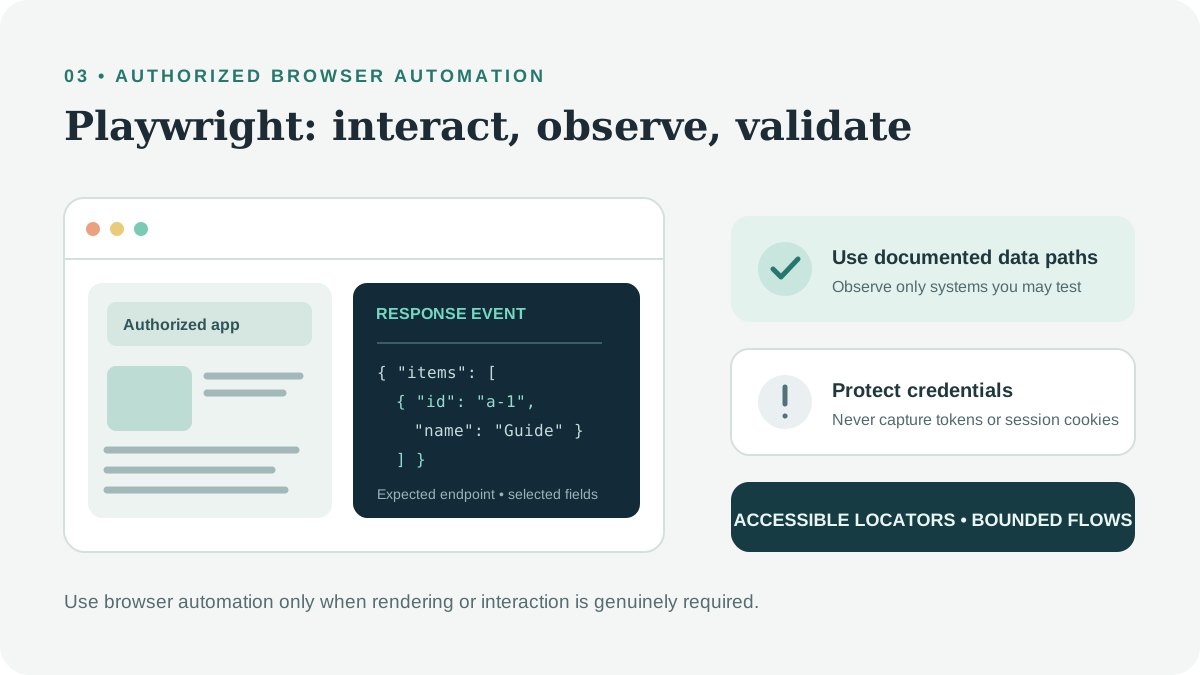
For static HTML or a supported API, use an HTTP client. Use browser automation when the workflow genuinely depends on JavaScript rendering or browser interaction, and only within an authorized scope.
Read data responses from an authorized application#
Playwright can observe response events from an application you own or are authorized to test. Filter narrowly by a documented endpoint and extract only the fields needed. Avoid logging authorization headers, cookies, personal data, or complete response bodies by default.
import asyncio
from playwright.async_api import async_playwright


async def main() -> None:
    async with async_playwright() as playwright:
        browser = await playwright.chromium.launch(headless=True)
        context = await browser.new_context()
        page = await context.new_page()
        await page.goto("https://app.example.org/catalog", wait_until="domcontentloaded")
        async with page.expect_response(
            lambda response: response.url.startswith("https://app.example.org/api/catalog")
            and response.status == 200
        ) as response_info:
            await page.get_by_role("button", name="Load catalog").click()
        payload = await (await response_info.value).json()
        records = [
            {"id": item.get("id"), "name": item.get("name")}
            for item in payload.get("items", [])
            if isinstance(item, dict)
        ]
        print(records)
        await context.close()
        await browser.close()


asyncio.run(main())
The response predicate should match the documented endpoint and expected status for your application. Let unexpected payload errors surface, and add sanitized error metrics at the job boundary rather than silently discarding data. Do not use response listeners to harvest bearer tokens or credentials. Selenium’s WebDriver BiDi network events can support authorized testing in versions that implement the needed events; check current browser and Selenium documentation, and never dump credential-bearing headers into logs.
UI state, infinite scroll, and Shadow DOM#
Prefer accessible locators and explicit state checks over fixed sleeps. For an authorized feed, scroll a bounded number of times and stop when no new records arrive:
async def load_visible_cards(page, max_rounds: int = 8) -> list[str]:
    seen: set[str] = set()
    for _ in range(max_rounds):
        cards = await page.locator("[data-testid='result-card']").all()
        before = len(seen)
        for card in cards:
            identifier = await card.get_attribute("data-id")
            if identifier:
                seen.add(identifier)
        if len(seen) == before:
            break
        await page.evaluate("window.scrollTo(0, document.body.scrollHeight)")
        await page.get_by_text("Loading", exact=True).wait_for(state="hidden", timeout=5_000)
    return sorted(seen)
For Shadow DOM, Playwright locators can pierce open shadow roots:
await page.locator("product-panel").get_by_role("button", name="Details").click()Closed shadow roots are intentionally not exposed to page scripts. Do not attempt to defeat that boundary; use a documented integration or request a test interface. For buttons and menus, prefer get_by_role, get_by_label, and get_by_test_id over coordinate clicks. Keep workflows bounded and handle consent, authentication, and access errors explicitly.
4. Level Three: Scrapy for Repeatable Crawls#
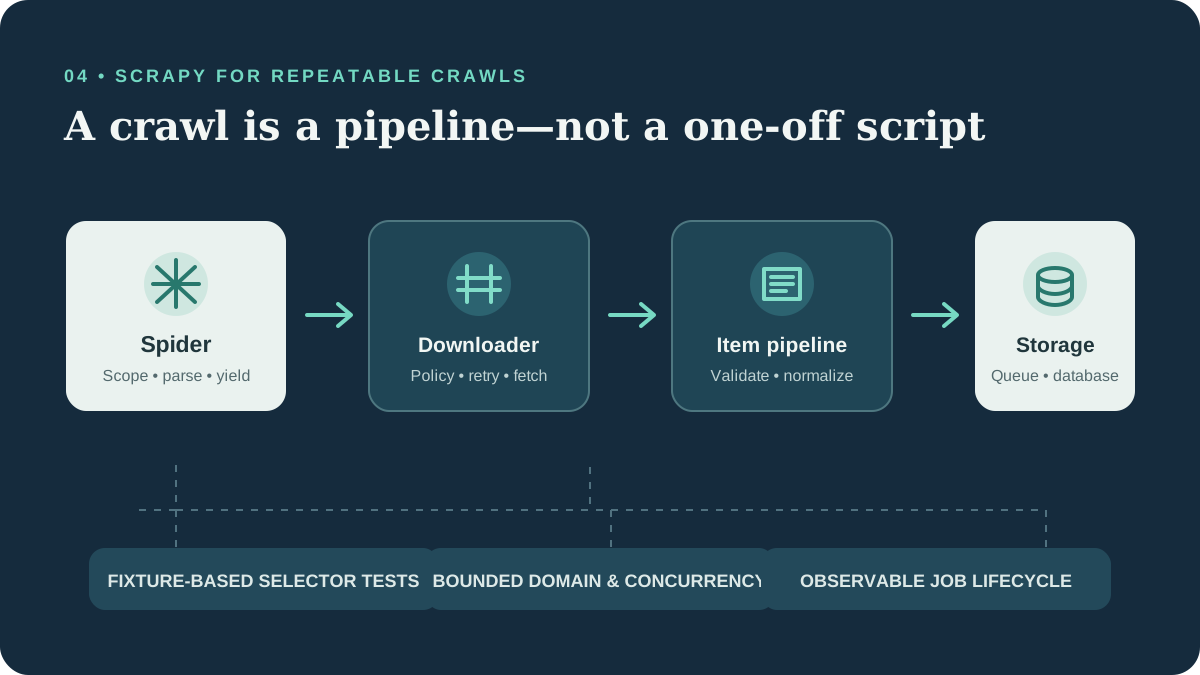
Scrapy provides a mature architecture for crawl projects:
- Spiders define allowed starting points, response parsing, and item generation.
- Downloader middleware handles request/response concerns such as user-agent identity, retries, and project-specific policy checks.
- Item pipelines validate, normalize, deduplicate, and persist extracted records.
- Settings centralize concurrency, delays, timeouts, robots behavior, and extensions.
Turn on robots policy and use conservative settings for an authorized domain:
# settings.py
ROBOTSTXT_OBEY = True
CONCURRENT_REQUESTS = 4
CONCURRENT_REQUESTS_PER_DOMAIN = 2
DOWNLOAD_DELAY = 1.0
DOWNLOAD_TIMEOUT = 20
RETRY_ENABLED = True
RETRY_TIMES = 2
USER_AGENT = "ExampleResearchBot/1.0 (+https://example.org/crawler-info)"
Spider selectors should be testable against saved fixtures rather than depending on live pages in every test run:
import scrapy


class DocumentationSpider(scrapy.Spider):
    name = "documentation"
    allowed_domains = ["docs.example.org"]
    start_urls = ["https://docs.example.org/guide/"]

    def parse(self, response):
        yield {
            "url": response.url,
            "title": response.css("main h1::text").get(default="").strip(),
            "summary": response.css("main p::text").get(default="").strip(),
        }
        for href in response.css("main a[href$='.html']::attr(href)").getall():
            yield response.follow(href, callback=self.parse)
Always validate links before following them, restrict allowed_domains, and ensure pagination has a finite stop condition. Keep the crawler’s permitted URL scope in configuration, not in untrusted request input.
Exposing a spider as an on-demand service#
“Scrapy-RT” is not a single built-in Scrapy feature with a universal API contract. For a real-time scraping service, separate the HTTP control plane from the crawler workers:
- An authenticated API validates a named job and enqueues it.
- A worker runs a pre-approved spider with a fixed domain allowlist.
- Results go to a queue or database; the API returns a job ID.
- A status endpoint reports queued, running, completed, or failed state.
- Apply authentication, quotas, audit logs, timeouts, and per-customer isolation.
Scrapyd is one option for scheduling deployed Scrapy projects. Keep it on a private network and put an authenticated service in front of it. Do not expose an endpoint that accepts arbitrary URLs or spider code:
import httpx


async def schedule_catalog_job(scrapyd_url: str, project: str) -> str:
    async with httpx.AsyncClient(timeout=10) as client:
        response = await client.post(
            f"{scrapyd_url.rstrip('/')}/schedule.json",
            data={"project": project, "spider": "documentation"},
        )
        response.raise_for_status()
        payload = response.json()
    if payload.get("status") != "ok" or not payload.get("jobid"):
        raise RuntimeError("Scrapyd did not return a job ID")
    return payload["jobid"]
In production, scrapyd_url must come from trusted configuration, not a caller-provided URL. Put the scheduler behind network controls and add service authentication at the API boundary.
5. Anti-Bot Controls, TLS Fingerprints, and Proxies#
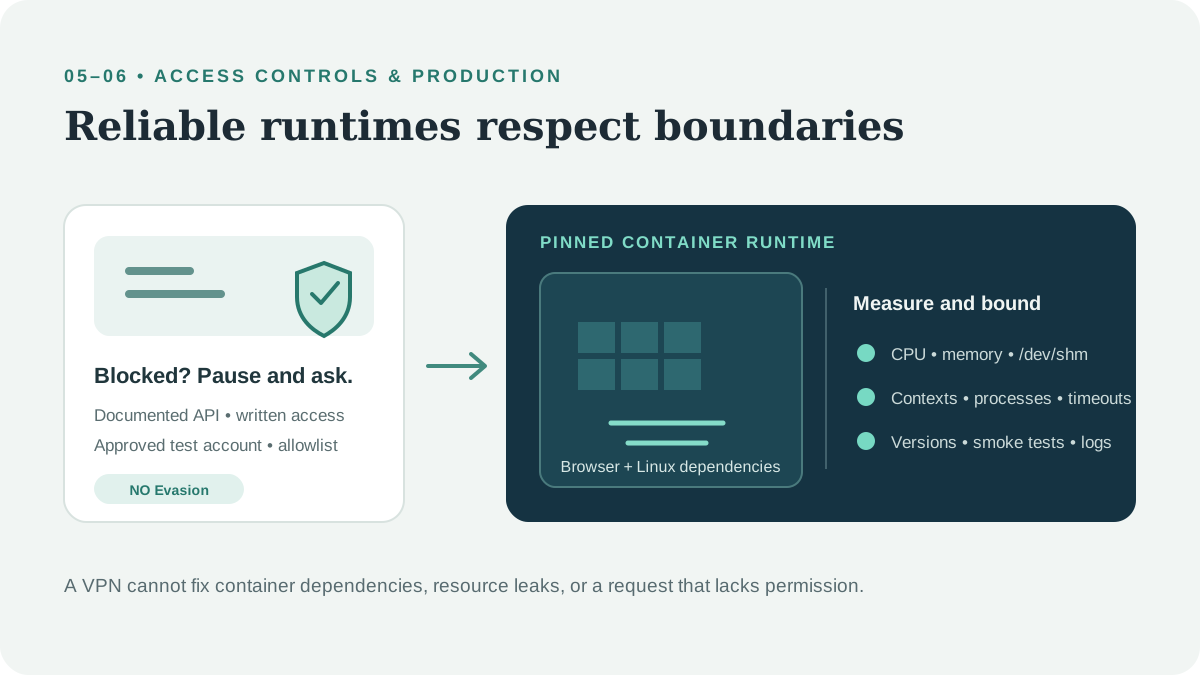
Bot protections—including rate limits, CAPTCHA, TLS/browser fingerprints, and access challenges—help site operators protect availability, accounts, and data. This guide does not provide instructions for bypassing Cloudflare or other anti-bot systems, spoofing TLS/JA4 fingerprints with curl_cffi, extracting JWTs, rotating residential identities to evade limits, or altering Canvas/WebGL/browser fingerprints to conceal automation.
If an authorized workflow receives a challenge, 403, or repeated 429:
- Stop or pause the job; do not retry aggressively.
- Check the provider’s documented API and automation policy.
- Contact the site owner for a supported integration, allowlisting, or test credentials.
- For your own service, configure an explicit service account, documented API route, or test environment.
- Record the response category without storing tokens, cookies, or personal data.
curl_cffi can support legitimate client compatibility and testing, but choosing a browser-like TLS profile does not grant permission to access a resource. TLS and JA4 fingerprints are signals a service may use to distinguish clients; treat them as controls to respect, not obstacles to defeat.
Datacenter, residential, and mobile egress describe network routes and addresses; none establishes authorization. For legitimate distributed systems, use a small number of documented, organization-managed egress gateways with stable identities, audit logs, and provider-approved allowlisting. Sticky or rotating sessions must never be used to circumvent a site’s access decisions or rate limits. A commercial VPN also does not change the legal or contractual status of a request; it may change routing, but cannot make a prohibited workflow permissible.
6. Local and Production Browser Runtimes#
A browser that works on a developer laptop may fail in a container because the environments differ. Common headless browser production deployment errors include:
- Missing browser binaries or shared libraries in the Linux image.
- Browser and automation-library version mismatches.
- Running as root with incompatible sandbox settings.
- Too little shared memory (
/dev/shm) for Chromium processes. - Exhausted CPU, RAM, file descriptors, or process limits under parallel jobs.
- Unclosed pages and contexts, causing resource leaks.
- Missing fonts, locale data, certificates, or writable cache directories.
- Egress rules, DNS, or proxies that differ from local development.
Use the browser installation and OS dependencies documented for the pinned Playwright/Selenium version. Pin versions, run as a non-root user where supported, set container resource limits, bound parallel contexts, and close browser resources with context managers or try/finally. Add a smoke test to the exact production image. Avoid disabling browser security controls as a shortcut; if the container requires a supported sandbox configuration, follow the browser vendor’s deployment guidance.
Start with HTTP requests rather than a browser when possible: browsers consume significantly more memory and CPU. Monitor queue depth, per-job duration, process restarts, and memory, then size workers based on measurements. A VPN is not a fix for missing libraries, sandbox configuration, or memory pressure.
7. AI-Assisted Extraction: Use It at the End of the Pipeline#
Language models can help classify ambiguous text, map inconsistent labels, or extract fields from genuinely unstructured passages. They are usually a poor first-stage parser for thousands of pages:
- Sending full pages wastes tokens on navigation and repeated boilerplate.
- Inference latency and cost grow with page count and context size.
- Output can omit fields, invent values, or vary in formatting.
- Reprocessing the same deterministic table with an LLM adds little value.
- Sensitive source text may be inappropriate to send to an external model.
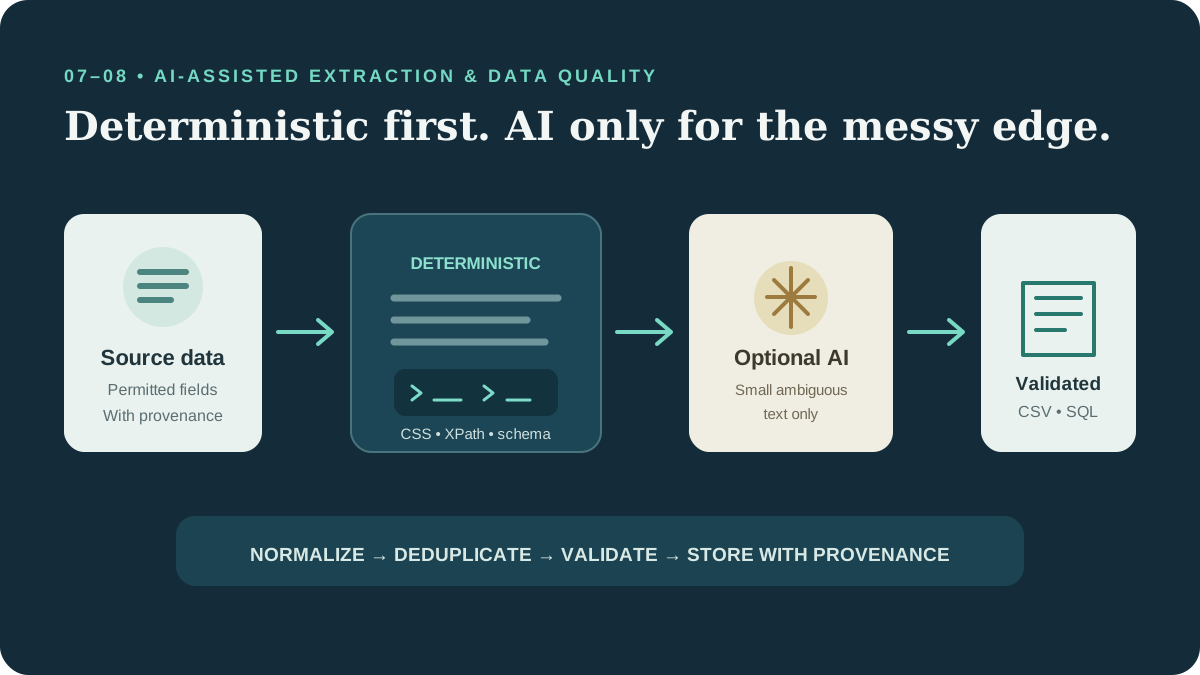
Use deterministic extraction first: JSON APIs, CSS/XPath, Parsel, and schema validation. Then send only the small, permitted, ambiguous text spans to an approved model with a strict output schema. Validate every field, keep provenance, record the model/version, and route low-confidence results for human review. AI can assist a data pipeline; it should not be treated as ground truth.
8. Clean, Deduplicate, and Store the Data#
Data quality checks belong between parsing and persistence. Normalize whitespace, validate identifiers, deduplicate on stable business keys, and preserve source URL and extraction time for provenance. Avoid storing secrets or personal data that the project does not need.
from datetime import datetime, timezone
import os
import sqlite3

import pandas as pd
from sqlalchemy import create_engine

records = [
    {"id": "a-1", "name": "  Example   Item ", "price": "12.50", "url": "https://docs.example.org/item/a-1"},
    {"id": "a-1", "name": "Example Item", "price": "12.50", "url": "https://docs.example.org/item/a-1"},
]

df = pd.DataFrame.from_records(records)
df["id"] = df["id"].astype("string").str.strip()
df["name"] = df["name"].astype("string").str.replace(r"\s+", " ", regex=True).str.strip()
df["price"] = pd.to_numeric(df["price"], errors="coerce")
df["url"] = df["url"].astype("string").str.strip()
df["extracted_at"] = datetime.now(timezone.utc).isoformat()
df = df.dropna(subset=["id", "name", "url"]).drop_duplicates(subset=["id"], keep="last")

df.to_csv("items.csv", index=False, encoding="utf-8")

with sqlite3.connect("items.sqlite") as connection:
    df.to_sql("items", connection, if_exists="replace", index=False)

# Set DATABASE_URL via your secret manager; never commit credentials.
engine = create_engine(os.environ["DATABASE_URL"])
with engine.begin() as connection:
    df.to_sql("items", connection, if_exists="append", index=False, method="multi")
engine.dispose()
For production, replace the illustrative database URL with a secret-manager-provided value, use a restricted database role, and parameterize table names from trusted configuration. if_exists="replace" is convenient for a local demonstration but can drop a table; use migrations and an upsert strategy for durable production data. Add constraints, schema-versioning, transaction boundaries, retention rules, and backups.
A Production Readiness Checklist#
- The data source, permitted scope, and business purpose are documented.
- An official API/export was considered before HTML parsing.
- Robots policy, terms, licenses, and privacy obligations were reviewed.
- Requests use an identifiable user agent and conservative per-host limits.
- Retries are bounded, jittered, and honor
Retry-After. - Authentication secrets are scoped, protected, and never logged.
- URLs and redirects are validated to prevent SSRF and scope expansion.
- Parsers have fixture-based tests and schema validation.
- Jobs have timeouts, cancellation, metrics, and resource limits.
- Access challenges and prohibitions cause the job to stop and request authorization.
- Stored data has provenance, retention controls, and a defined access policy.
The strongest scraping system is not the one that defeats the most defenses. It is the one that obtains permission, uses the least fragile data interface, handles failures safely, and produces auditable data at a rate the source can support.